
ADOBE EXPRESS
Express lets you drop in shapes and lines, but it has no real pen – no point-by-point paths, no bezier curves, no drawing a custom shape from scratch. So the moment you need a bespoke icon, a logo mark, or a shape that isn't in the library, you hit the ceiling. Pen Pal adds a proper pen: tap for corners, tap-and-drag for curves, and the result lands on your canvas as native, editable vector – not a flattened picture of one. The drawing tool Express has been missing
Live preview
PREVIEW
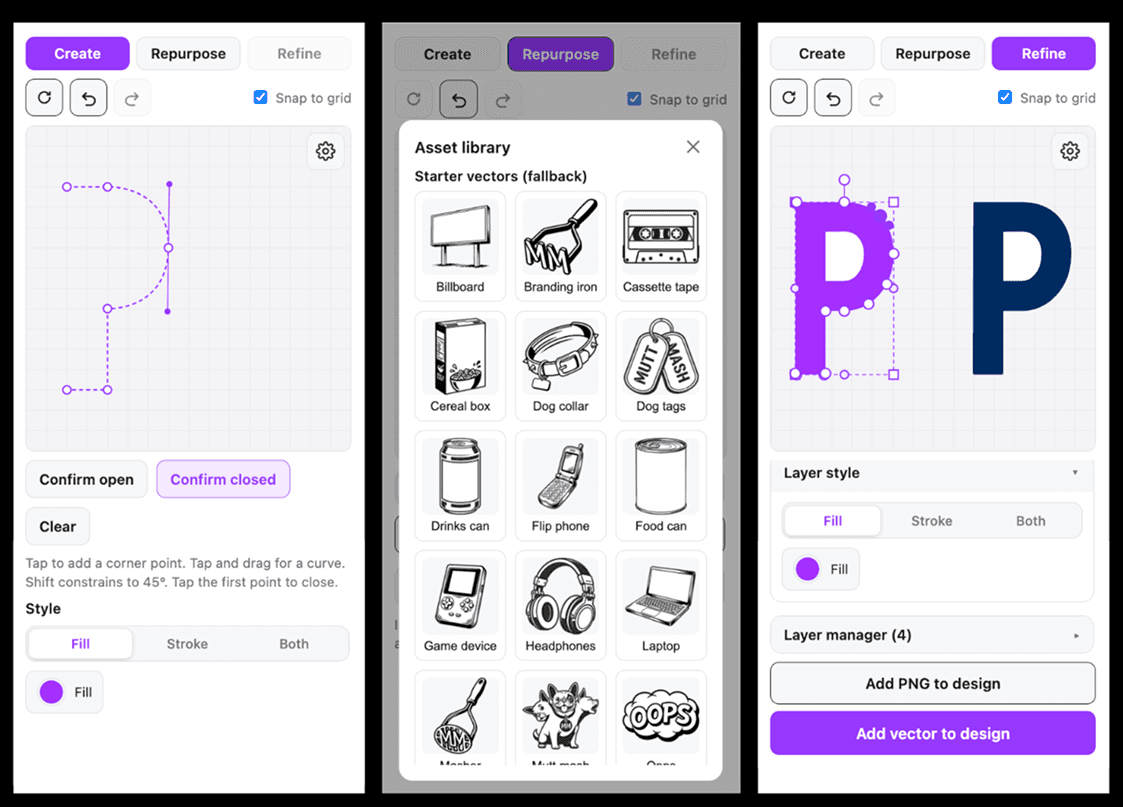
Tap to set a point. Drag to curve it. Build the exact shape in your head, right on the page – then drop it in as clean vector you can keep editing, forever.
Key features
Draw with an actual pen
Tap for corners, tap-and-drag for curves. Build paths point by point, the way vectors are meant to be drawn – not traced, not approximated.
Bezier curves that behave
Drag the handles, shape the curve, hold Alt to break a handle when you want an asymmetric bend. Every point is yours to push around.
Every corner, your call
Sharp corner today, smooth curve tomorrow – round it off or chamfer it flat, with a live preview before you commit.
Edit every point, forever
Move anchors, add points, delete points, drag handles. Nothing is baked – a path stays fully editable for as long as you're fiddling with it.
Open it, close it, break it, join it
Snip a path open at any point, split an open path into two, or drag two ends together to close a loop or weld separate paths into one.
Bring your own vectors in
Already got a shape on your canvas? Select it and pull it in as editable points. Got an SVG? Upload it. Multi-part logo? Pick the exact piece you want to work on, and Pen Pal keeps the rest as a dimmed reference behind it, so you always know where your shape belongs.
Style it your way
Fill, stroke, or both – your colors, your stroke weight, your choice of how ends and corners behave. Pen Pal places it all faithfully as real vectors.
Lands as native shapes
Everything you make drops onto your Express canvas as a proper vector – recolorable, scalable, and yours to keep working with. Not a flattened image. A real shape.
Built for actually working
Undo, redo, snap to grid, keyboard shortcuts throughout – the quiet stuff that makes a tool feel like a tool.
TUTORIAL